Gareth is a brand identity designer specialising in creative logo design & identity.
He is the author of Smashing Logo Design, a book dedicated to everything 'logo'.
Happy Easter to all my clients, fellow designers & friends worldwide. Enjoy the short break and I will see you on Tuesday for more design madness. I leave you with a carbon copy of the Turin Shroud that I just found in my attic. I think he is listening to Metallica. DWD.
Anyone that has ever used word processing software has the ability to arrange content on a page. Most non-designers will be familiar with headers and footers and a select few will even know what the term "body text" means, and most beginners will not know what a "pull quote" is used for. When it comes to being a design professional, page layouts and the use of typography can become far more complicated, so it is important to have knowledge of advanced layout and typographical terms which can visually transform and improve any design if implemented appropriately. We take a look at 10 Advanced Web Design Layout & Typographic Elements as well as analysing some creative examples.
Standfirsts
To accompany a headline and to give a short introduction to the forthcoming content, a designer will often use a standfirst which consists of one or two sentences so to not give too much away but to grab the readers attention and to encourage them to read the whole content. An effective standfirst should be set in type that is larger than the main body of text but smaller than the main headline. Articles are becoming a more prominent feature of web content which is why standifrsts are becoming more recognisable and commonplace.
Creative Examples
37 Signals – a simple method of encouraging the user to continue reading the content. Andy Rutledge – the contrast in size to the header causes intrigue. Wilson Miner gives the summary emphasis by placing it into its own column. The Morning News makes good use a typical magazine styling. Webstock uses a similar approach but set in italics for added emphasis.
Quotations
Quotations come ina variety of forms, be it pull quotes, citations or block quotes, each are used to highlight important excerpts of content. The rise of the blog article has seen the pull quote make the jump from the world of print on to the digital screen. effective usage and styling of quotations can grab the reader’s attention from the main body of text, which is commonly achieved by being set in a larger typeface in comparison.
Creative Examples
Whooray Records – here the pull-quote is centre-stage. Quotations Book – multiple quotations unified by colour. David Ville – a quotation set in a larger point size to the body text. Valencias Consulting displays a testimonial as the first piece of content. Kupferwerk – in a style borrowed from the world of print.
Modular Grids
Alternatively known as fields, modules are formed by the horizontal and vertical dividers which form the grid. These individual units of space provide the designer with the possible proportions for images, headlines or other layout elements high in the page hierachy. Modular based grids are seen as rigid and give the content of the page a clear sense of order.
Creative Examples
Burger King – modules employed for a unique method of navigation.
Typeneu uses all of the available grid space. Work Club – a more familiar use of modular based layout.
Fudge – an interesting layout that draws the eye to the featured content.
Decorated Type
In web design, typography is often overlooked. A new trend to give type added distinction is to add intricate illustration and decoration. This can be achieved by either integrating the typography into the background styling or by giving it a unique characteristic as a design feature
Creative Examples
Hypr illustrate their typographic logo differently for each page.
Art Concept – large decorated type as the main focal point.
Matt Mullenweg uses important information incorporated into in illustration.
The Single-Column Grid
The usage of single-column grids is seen prominently on blogs. Viewed as a means to effectively give emphasis to simplistic content, the single column does not distract the viewer from the main content, which can be a problem with content heavy sites that uses many columns for layout. Naturally, the single column requires that the user has to scroll to read all of the available information.
Creative Examples
Mancub – familiar stacked content in a single column.
Iemai – a single column to represent continuous content.
Clemente – images is used to define the column dimensions.
Drop Capitals
When the first letter of text is set in a much larger size it is referred to as a drop capital. A drop capital is commonly aligned with the top of the column and can be the same height of several lines of text. When aligned to the base of the first line it is referred to as a "Standing Capital". The drop capital doesn’t have to be set in the same typeface or colour as the main copy in order to gain attention. This typographic style first came to light in ancient scriptures where Drop Capitals were heavily illustrated and decorated. Today, more and more designers are using drop capitals in the design of websites to mimic the world of print in a digital environment.
Creative Examples
What Katie Does uses a subtle drop-capital that adds unique detail.
Darren Hoyt – aligned to three lines of body text. Estate Black – a larger drop-capital aligned to 5 lines.
Rodriguez Velasco uses colour to further enhance the design element.
We are used to seeing the typical layout of a website aligned to the top centre of the page or with very small top margin. Designers are pushing the boundries by using extreme margins or different styles of alignment to give more of a sense of rebellion against the norm. Flash plays a major factor in the usage of this design element due to its capability of maximising the available screen area.
Ayaka Ito allows maximum space for illustration as opposed to content.
Extreme Display Type
Any text that is set in a larger size to the body text is deemed to be classed as display type. In some cases designers have taken display type to the extreme, by setting it in an enormous size and in some cases featuring it as the main focal point. An effective usage is for creative straplines or unique messages that can instantly grab a visitors attention.
Creative Examples
Big Cartel use extreme display type for their strapline.
Carsonified – larger type to communicate a unique message. ESPN Magazine – the type-based logo is given greatest prominence. dConstruct – essential event details set in a large size. IAAH – uses larger set type in abundance.
Just Type
Content is said to be king, after all the purpose of a website is to display information. Visitors to websites, especially creative folk, often overlook the content on offer and focus upon the style. The perfect way to marry the two principles is to use creatively typography solely as the design element, which can encourage the user to read the content whilst still forming an aesthetically pleasing solution.
Creative Examples
Quipsologies cleverly uses different typefaces to guide the eye around the page. YOU – ultra-minimalistic to force the viewer to read. Joshua Distler arranges typography into given coloured categories. Sold-Out uses type only to display a wealthy number of links. The Grid System practices what it preaches.
Breaking The Rules
With the rise of accessibility issues and the increased implementation of standards, particularly in CSS & HTML, you could argue that more restrictions than ever are placed upon todays web designers. However, as web design trends continue to be overlooked and the use of templates seems to be gradually increasing, the challenge to break outside of the structured grid has been laid down for todays creative web designer.
Creative Examples
Basil Gloo gets inside a unique layout. Davor Vanejik uses a staggered layout as opposed to inline. Jeremy Levine – navigation that puts complete focus upon the content.
The Horizontal Way surprises the user with an allternative scrolling approach. BootB – innovative navigation that certainly breaks the grid.
Firstly, I would like to point out that this article is by no means serious in any way and is just a very extravagant analysis made by a designer with too much time on his hands and an over active imagination.
I recently heard a claim along the lines of:
50% of the money in the world is controlled by 1% of the population.
The amount of truth in that statement is questionable but also intriguing. I began to wonder about just how powerful the huge brands really are. What exactly makes them so successful and why do people continue to support them? Is it brand loyalty? Hypnotism? Something must keep things ticking over. I wondered if there were any hidden messages in the logos of these companies to encourage people to spend their hard earned cash or maybe even reveal their true identities. Below are the results of my spooky findings. How many of the well-known companies can you spot?
Way back in June 2009 I wrote a certain article for Smashing Magazine and it got both positive and negative reviews. The article was in fact edited and included words which I would never dream of using. Some have said that that this list is aimed at beginners rather than experienced designers, which suggests that have missed the purpose of this article and more importantly the title. This is a compilation of the most “common” mistakes in the field I see being made every day, it is not a guide on how to create a logo. For anyone that is interested, here is the original raw article from start to finish:
Such is the power of the internet, with more eyes watcing than ever, it’s important for a business to communicate their unique message clearly. The easiest way to visually recognise and differentiate companies is via their respective logos.
Below we detail 10 common logo design mistakes you should avoid to create a successful and professional logo.
1. Designed By An Amateur
Avoid websites offering ridiculously cheap logo packages. You get what you pay for
A professional business should look professional. New business owners can often invest large amounts of time and money on premises and equipment, but when it comes to investing in a suitable logo the effort is not always matched.
The most common reasons why a logo has been designed by an amateur are:
the business owner sought to save money by designing a quick logo themselves
a friend or relative who claims to know a little about graphic design did it as a favour
the wrong people were commissioned. A local printers are not likely to be proficient in logo design
the business outsourced the job to a design competition website, which are in the main populated by amateur designers
the job was given to a website that offers really cheap logos
All of the above can result in a disastrous outcome. If your logo looks amateur, then so does your business. It’s important for a business to know where to look when seeking a new logo. David Airey offers a great insight on how to choose the right logo designer for your requirements.
The advantages of hiring an established and professional logo designer are:
your logo will be unique and memorable
there will be no problems further down the line for reproduction
your logo will have a longer lifespan and will not need to be redesigned every couple of years
your logo will represent your business in a professional manner
2. Using Raster Images
An example of how raster graphics can limit reproduction
The standard practice when designing a logo is to use Vector Graphics software, such as Adobe Illustrator or Corel Draw. A Vector Graphic is made up of mathematically precise points, which provides visual consistency at multiple sizes. The alternative of course is use to Raster Graphics software such as Photoshop.
A Raster Graphic, or Bitmap as they’re commonly called, consists of pixels.
The use of raster images in logos is frowned upon as it can cause problems for reproduction. Whilst you are still able to create a logo at high resolution in Photoshop, you will never know for sure how large it will need to be reproduced. If you zoom in on a raster graphic, it will eventually appear pixelated, rendering it inpractial. It’s essential for a logo to look the same at all sizes to maintain visual recognition.
The main advantages of using vector graphics in logo design are:
the logo can be scaled at any size without losing quality
it makes editing the logo at a later stage a much easier process
vector graphics can be applied to other design mediums easier than raster images
3. Using Stock Art
Using stock vector graphics in a logo can put your client at risk
This mistake is often made by business owners attempting to design their own logo or by amateur designers who are not clued up on the laws of copyright. Downloading stock vector imagery from sites such as VectorStock is not a crime, but it can get you into a lot of trouble if you decide to implement it into a logo.
A logo should be unique and original with the license agreement being exclusive to the client, using stock art breaks all of these rules. Chances are if you use a stock vector it is being used someone else in the world, so if used in a logo it no langer makes the business unique. You can spot a stock vector in a logo as they are normally familiar shapes such as globes or silhouettes.
4. Designing For Yourself Rather Than The Client
You should never input your own personality into client work
You can normally spot this logo design sin a mile off, and is usually the result of the designer having an enormous ego. If there is a cool new font that you love and just can’t wait to use it in your design, well, don’t. Is it really appropriate for the nature of the business your designing for? Your idea for a great modern typographic solution is unlikely to be suitable for a serious business such as a sollicitors.
Some designers also make the mistake of including their "recognisable style" in their work. Whilst it’s fair to say that you should be proud of your work it’s wrong to input your own personality into a logo. Stay focused on the clients requirements by sticking to the brief.
5. Relying On Trends
Focusing on current logo trends is like putting a sell by date on a logo
Trends come and go, swooshes, glows, bevels, which ultimately end up as cliches. A well designed logo should be timeless and this can be achieved by ignoring the latest design trick or gimmick. The most common cliche in logo design is the dreaded "corporate swoosh" which is the ultimate way to play it safe. As a logo designer, it is your job to create a unique identity for your client, so it is best practice to completely ignore logo design trends.
Logolounge have a great section on their website which details current logo design trends which is updated every year. It’s important as a designer that you are aware of the latest craze, mostly so that you can avoid it at all costs.
6. Over Complexity
Highly detailed designs are unlikely to scale well when printed or viewed at smaller sizes
Designers should be familiar with thumbnail images, so what better way to explain this common mistake than to refer to a finger print. If you take a look at your finger you will notice that you can only see the detail of your fingerprint when it is really close to your face, if you move your finger away the fingerprint is no longer visible. The same applies to highly detailed logo designs.
When printed, a complex design will lose detail at smaller sizes, and in some cases can look just like a smudge, or a mistake. The more detail in a logo means there is more information for the viewer to acknowledge. A great logo should be memorable and the best way to achieve this is to keep things simple. Take a look at the corporate identities of Nike, McDonald’s & Apple. Each company owns a very simple icon which is easily reproduced at any size.
7. Relying On Color
In the absence of colour your great design might lose it’s identity
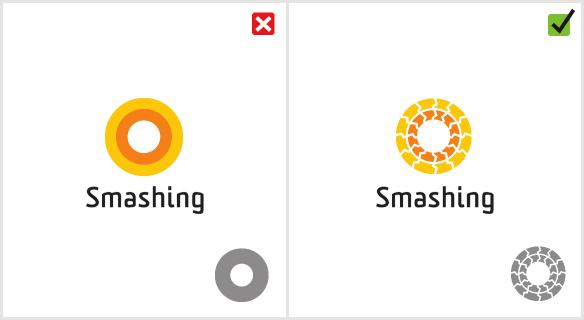
This is a very common mistake to make. Some designers cannot wait to start adding colour to a design, and some logos even rely on it completely. Choosing colour should be the last decision, so it is best to start work in black and white.
There will come a time when a logo will need to be reproduced in one colour, so it’s important for a logo designer to test if this effects the identity. If colour helps to identify certain elements of the design then it will look completely diffferent in one tone.
8. Poor Choice Of Font
Deciding upon a font can make or break a great logo
When it comes to executing a logo concept, choosing the right font is the most important decision a designer can make. More often than not, a logo will be let down by a poor font choice (in our example the popular Comic Sans).
How to find the perfect font for your design is all about matching the style of the icon, but this can be tricky. If the match is too good the mark and font compete with each other for visual attention, if it’s completely opposite then the viewer will not know where to focus. The key is achieveing the right balance, somewhere in the middle. Each typeface has a personality, if the font you have chosen does not reflect the characteristics of the mark then the whole brand message will be miscommunicated.
The mistake of poor font choice is often made when not taking the decision seriously enough. Some designers simply throw the type in as an after thought. Professional font foundries such as MyFonts & FontFont offer great typefaces which are a better option than over-used free downloads.
9. Using Too Many Fonts
A logo works best with a maximum of two fonts
Using too many fonts is like trying to show someone a whole photo album all at once. Each typeface looks different, and the viewer needs time to recognise each face, seeing too many all at once can cause confusion.
It is standard practice to use a maximum of two fonts or differing weights. Restricting the amount of fonts in a logo design can greatly improve the legibility and increase brand recognition.
10. Copying Others
This is the biggest logo design mistake of all, and unfortunately is becoming more and more common. As has been said already in this article, the main purpose of a logo is to identify a business, if it looks the same as someone else, it fails. Copying others does nobody any favours, including the client and the designer.
What would you do if you wanted to buy…say..an electric toothbrush? You might inquire at your dentist or take a chance at the local chemist but I would put money on most ordering from a website. Before the dawn of the internet, when most people shopped in REAL shops, there was a store that claimed to stock everything. From jewellery to spice racks, it had it all. And it still does. That company is Argos. Here is the logo you may know them by:
It was never anything that made you stop in your tracks and admire, but it was obviously one of those branding exercises where the client wanted everything to be bright to hook you in, because apparently people are attracted to bright things? Or is that magpies? Anyway, I can always remember the bright blue store fronts and cheekily sitting on the comfortable sofas that they had on show to rest my legs. (You know you’ve done it.)
If you have picked up a catalogue recently or visited their website then you might have noticed that it looks a little different. Yes, they have changed their identity:
It’s red. It’s happy. And it’s safe. Very safe actually, and a little bland if I am honest. I find it quite interesting that the online equivalent, Amazon, also use a smile in their logo, but supporters of Argos will tell you that the Argos logo has been smiling long before Amazon ever came to be. It will be interesting to see who will have the last laugh, as I can’t help but think that online shopping has put a dent in Argos’ fat cats pockets. I wonder how long it will be until we have Amazon stores on the high street?
I posted this article about how the “credit crunch” was effecting designers last year so I thought it might be a good idea to give it a little revisit. I got thinking about how the industry has adapted to the challenges brought about by restrictions & the main change that I can see is that the role of social media has exploded.
2009 really was the year that social networking took off in the mainstream. As more and more people jump on the bandwagon, more voices are added to the simmering online stew hence more facebook users to get on your nerves and even more self proclaimed social media experts telling you how to become……a social media expert. (If they were real experts they would know better than to tell you this every 10 minutes).
Everyone, and I mean everyone has something to say, whether it is important or interesting is another matter but they will do a good job of trying to get you to hear it (that’s if they are a self proclaimed expert). And that is perfectly fair. I’m not exactly sure whether social media has directly increased the number of designers in the world, but one thing is for certain, it makes you aware of just how many there are.
There is one interesting trend that I have noticed. The big agencies don’t really “tweet” or “blog” that much, mainly because they don’t have to, they have their reputation to rely on. For smaller independent companies and freelancers the situation is different, social media becomes an avenue for exposure, after all that’s exactly what the vehicle of social media is, a cry for attention. Is this an advantage?
Absolutely. Anything that creates connections amongst people can only be a good thing. When used in moderation that is. However, it can be abused, and I see it every day. There seems to be a new design blog or a new “THE source for inspiration” website appearing every week. I’ve never really understood why some designers can only create by looking at something first anyway. Is that even classed as creativity? Or thinking? That’s another argument. It’s getting to the point of where most of the articles you read give you a sense of deja vu, probably because you read a very similar article on a similar website just a few weeks before.
Ever read a blog post that has no real substance and a fair amount of random words are made bold or are even hyperlinks? I’m sure you have. That’s a cunning tactic to make the search engines squeal with delight when searching for those keywords, it doesn’t really matter if the article is crap, google doesn’t care and neither does the person who wrote it, as long as an increase in web traffic is reached then everyone is a winner baby. So therefore we can sort of work out a formula for supposed social media success in the design world.
Design Company Owner + SEO / Social Media = Increased Web Traffic = More Potential Leads.
And we all know that an increase in leads can increase the chance of a sale. It’s quite simple when you think about it. So what happens now? Do you sit and wade our way through all of the social media trash looking for a real piece of interest or do we add to the madness that seems to be spiralling out of control?
For a music channel that is 30 years old next year it could be forgivable for them to show signs of aging, maybe even a little stuck in their ways. But a brand aimed at a younger fashion savvy generation can’t afford to be left behind, and I think this is reason for the recent brand overhaul of MTV. See below:
Is it fatter or shorter? I will let you decide. However, the most notable change is the removal of the words “Music Television” from the logo showing that MTV obviously thinks they have been around long enough for them to lose the descriptor, a tactic also employed by the likes of huge multinationals Nike, Apple & McDonald’s. Also, notice the clipping mask of random images for the background? Looks like the Aolesque™ trend is really kicking in now, but that’s for another article.
You can read more on the new MTV brand over at Rolling Stone
How do you give something that is invisible an identity? Something that you use everyday without being able to touch it. It has no packaging, yet comes in packages so to speak. I am obviously talking about Cellular Mobile Networks.
There are said to be 62.5 million mobile phones in the UK alone, and of course to be able to use one you need a service. Branding a service can be tricky but often provides the greatest room for creativity as the onus is more on the experience that the consumer experiences as opposed to the performance of a product you can see and replace when needed.
The cellular network industry is growing at a phenomenal rate as independent smaller service providers are looking to find a niche, even the huge supermarket chain Tesco now offers Tesco Mobile as part of their brand family. An increase in choice can make the decision of choosing which network is right for you more difficult, but the common trend is to make decision based on price or due to customer loyalty.
However, this doesn’t stop these 21st century companies being creative with their branding, as the following advertisement by”3″ and a collection of cellular network logos from around the world clearly demonstrate.
Having recently secured an ongoing contract with Peder Johnsen, I am pleased to announce the first of the completed identity projects. www.upsoftware.net promises to be an exciting avenue for modern web applications that will bring life to your desktop. More identity projects with Peder are close to completion, so keep coming back for more.
Having been contacted by the highly ambitious programmer, Tom Arnfield, I was employed to design a logo for a new content management system. Tom, who is extremely talented for his age, says that Invisible CMS will be unique in part that the whole interface can be customised, allowing you to move every single design element of your website easily and efficiently. My inspiration for the logo was one of those old school photo puzzles that you used to get seen here. To find out when Invisible CMS is going to be launched please be sure to check their website regularly at: www.invisiblecms.com. I would like to wish Tom the best of luck in this venture.
As a thankyou for recently interviewing me I decided to offer my (amateur) writing skills to www.logofromdreams.com. I find it fascinating that almost everything we own has a logo in some form, and for this article I decided to focus upon the many varied custom typefaces that car manufacturers apply to their vehicles. Each different design has a unique personality.